Complete guide
How to Make a Song with AI (Complete Guide)
The short answer
Describe the song you want, or paste lyrics you wrote, choose a style, and press Generate. That is genuinely all it takes. On aisong.io one generation costs 10 credits and gives you two different takes of the song, usually within a minute or two. Free accounts get 20 credits a day, so you can make four songs a day without paying.
We build aisong.io, an all-in-one AI music creation platform. It starts with an AI song generator and covers everything around it: lyrics, editing, stems, cover art, music videos and release-ready files.
Most of the questions we get from new users are some version of "where do I start?" and "which tool does what?". This page is our answer, written the way we would explain it to a friend.
The short version: making the song is the easy part. What turns a one-off experiment into something you can actually release is everything around it, which is why it all lives in one place here. We start with the tools people use most and work outward from there.
How do I make my first AI song?
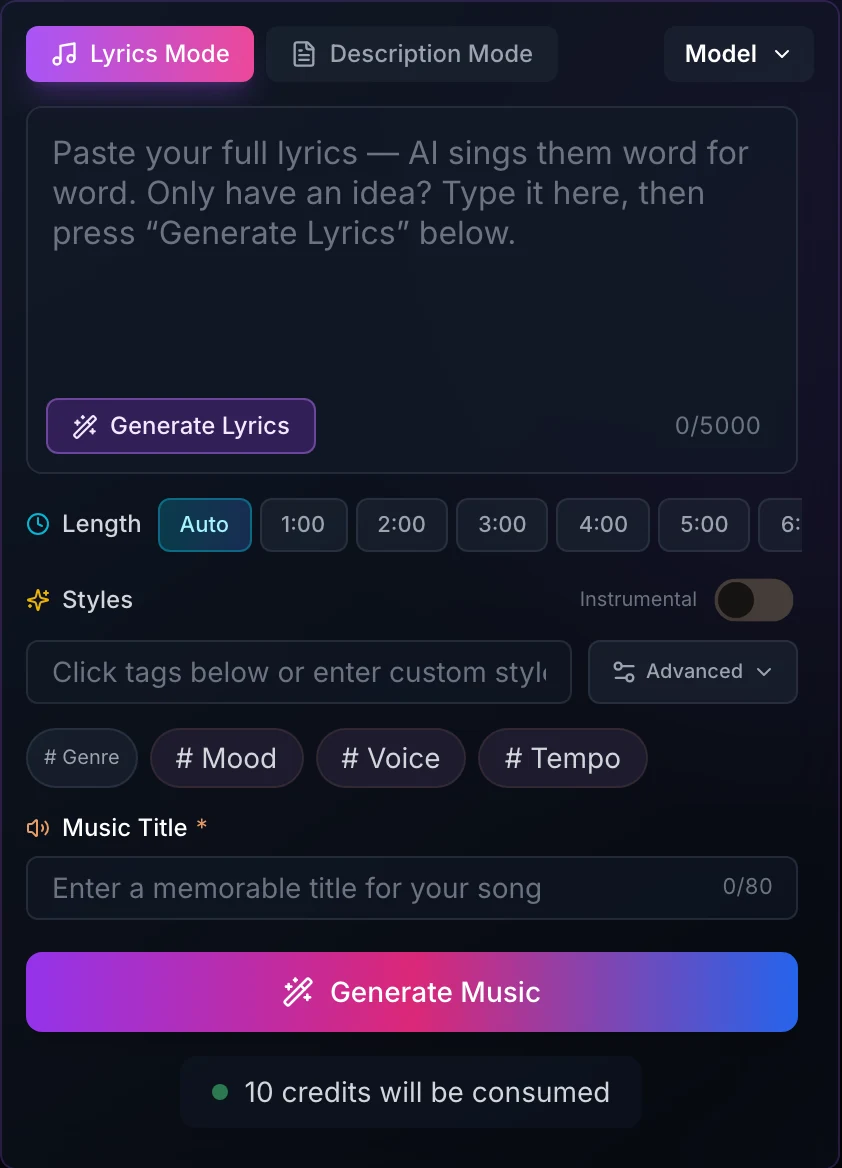
Everything here happens in the AI Music Generator. You do not need to know any music theory.
- 1
Pick a mode
Description Mode is for when you have an idea but no lyrics. Type something like "a warm acoustic song about moving to a new city, female vocal, hopeful" and the lyrics are written for you (the description and style tags share a 500-character limit). Lyrics Mode is for when you already have words: they are sung as written, up to 5,000 characters. If you paste finished lyrics into Description Mode, they will be rewritten.
- 2
Shape the sound
Add a few style tags for genre, mood, voice and tempo. Three or four tags usually work better than ten, and describe the sound rather than naming an artist. In Lyrics Mode you can also set the Length: Auto, or 1 to 6 minutes. In Description Mode the length is chosen for you, usually 3 to 4 minutes. Turn on Instrumental if you do not want vocals, and give the song a title (up to 80 characters).
- 3
Generate and keep the better take
Press Generate Music. You get two versions for 10 credits, and they are often quite different, so listen to both before deciding. Both appear in the song list on the right of the generator, where each song has its own buttons and a ⋯ menu for extending, covering, editing and downloading it. My Works keeps all your songs in one place for downloading, sharing and renaming.
Three things we wish every new user knew
- Label sections with square brackets: [Verse], [Chorus], [Bridge]. Round brackets like (Chorus) are sometimes sung out loud as if they were lyrics.
- Generate Lyrics replaces whatever is in the lyrics box. If you have a draft you like, copy it somewhere first.
- Not happy with either take? Change one thing (a tag, a line, the tempo) rather than regenerating with the exact same input.
- Generate Lyrics writes in the language of what you type. For lyrics in Spanish or Japanese, write your idea in that language, or say which language you want.
What a single generation sounds like
Three songs made in the generator, each from the style tags shown. Press play; nothing loads until you do.

Let Me Find My Peace Within
Style tags: Emotional, Ballad, Healing
Chorus lyrics
Please let me breathe againLet me find my peace withinGive me a chance to mend what’s brokenLet me breathe, let me begin

Through the Pulse of the Night
Style tags: Pop, Electronic, Urban
Chorus lyrics
Oh, the dreams come quick, they come aliveElectric currents in the city’s driveThrough the pulse and the pulse of the nightIn the city where the lights never quit

Rise Up Stand Tall
Style tags: Inspirational, Motivational, Powerful
Chorus lyrics
Rise up, stand strongLet the world see your crownRise up, feel the dawnEmbrace the brand new sound
Which aisong.io tool should I use?
If you already know what you want to do, start here.
| I want to… | Use | Cost |
|---|---|---|
| Make a song from an idea or lyrics | AI Music Generator | 10 credits (gives 2 songs) |
| Make a song longer | Extend | 10 credits |
| Hear a song in another style | Cover | 10 credits |
| Fix one line or section | Song Editor | 10 credits |
| Remove vocals or split stems | Stem Splitter | 10 credits (2 stems), 50 credits (12 stems) |
| Put singing on a beat | Add Vocals | 10 credits |
| Put music under a vocal | Add Instrumental | 10 credits |
| Album art, a logo or a poster | AI Image Generator | 7 to 32 credits per image |
| A full music video | AI Music Video Generator | From 600 credits per minute |
| Make a photo sing | Lip Sync Music Video | From 10 credits per second |
| Short clips or a Spotify Canvas loop | Short Video Maker, Lyric Card | From 28 credits (Short Video Maker), 10 credits (Lyric Card) |
| Synced lyrics or subtitles | LRC Generator | 10 credits |
| Write lyrics or check rhymes | Lyrics Generator, Rhyme Analyzer | Free |
How do I edit an AI song after it is made?
This is where most of the real work happens. A generated song is rarely perfect on the first try, and regenerating from scratch throws away the parts you liked. These tools let you keep them. Extend, Cover, Replace Section and the Stem Splitter work on songs you have made: open the AI Music Generator and use the buttons on the song in the list on the right. Add Vocals and Add Instrumental take audio you upload.
Extend
Continues a song from a point you choose, in the same style. Use it to add another verse, a longer outro, or to build a track past six minutes. Each extension adds 30 seconds to 4 minutes (2 minutes by default), and you get back the whole song, not just the new part.
Credits: 10 · Where: the Extend Music button on the song in the generator’s song list (on mobile, in the ⋯ menu)
Good to know
- Pick a clean starting point, like the end of a chorus. Continuing from the middle of a word rarely sounds natural.
- Smart mode carries on in the same style. Custom mode lets you set new lyrics, style and title for the added part.
Cover
Re-performs a song in a new genre or with a different voice while keeping the melody and lyrics. A ballad as a punk track, a pop song as lo-fi, that kind of thing. The cover keeps roughly the length of the original.
Credits: 10 · Where: Cover Music, in the song’s ⋯ menu in the generator’s song list
Good to know
- Cover works on songs you have made on aisong.io. There is no option to upload someone else’s track and cover it.
Song Editor (Replace Section)
Select part of a song and regenerate only that part. We use it most for a single mispronounced word or a chorus that lands flat, where everything else is worth keeping.
Credits: 10 · Where: the Replace Section button on the song in the generator’s song list (on mobile, in the ⋯ menu)
Good to know
- The selection has to be between 6 and 60 seconds. For a single word, select the whole line around it so the new take has room to blend in.
Stem Splitter
Splits a song you made on aisong.io into vocals and instrumental (2 stems), or into up to 12 stems: lead and backing vocals, drums, bass, guitar, keys, percussion, strings, synth, effects, brass and woodwinds. A typical 3 to 4 minute song takes a minute or two.
Credits: 10 for 2 stems, 50 for 12 stems · Where: Separate Vocals, in the song’s ⋯ menu in the generator’s song list, or the Stem Splitter page
Good to know
- Two stems is enough for karaoke or an instrumental. Choose 12 only if you plan to remix in a DAW.
- The stems stay attached to the original song (open its ⋯ menu and choose View Separated Tracks), rather than appearing as a new song in the list. Splitting the same song again costs nothing.
Add Vocals
Upload an instrumental, type your lyrics, and it sings them over your track. Useful for producers who make beats but do not sing. You need to supply the lyrics; draft them in the Lyrics Generator first if you are stuck.
Credits: 10
Good to know
- If an upload is rejected as copyrighted material, uploading the same file again will fail the same way. Use your own beat, or export a different version of it.
Add Instrumental
The opposite direction: upload a vocal or a rap recorded on your phone and get a full arrangement built around it.
Credits: 10
Try the AI instrumental generatorBrowser audio tools
Audio Cutter, Audio Joiner, Audio Converter, Pitch Changer and Speed Changer. They run in your browser, so your file never leaves your computer, and they are free.
Credits: Free
See all free audio toolsHow do I turn a song into a music video?
We have four video tools, and people mix them up constantly. The quick way to choose: how long should the video be, and what should be in it? The table sums it up.
| Tool | Best for | Length | Output | Cost |
|---|---|---|---|---|
| AI Music Video Generator | A full music video for the whole song | 10 s to 5 min | Multi-shot, 720p or 1080p | From 600 credits / min |
| Lip Sync Music Video | A photo or character singing your song | Up to 10 min | Singing face, 480p or 720p | From 10 credits / sec |
| Short Video Maker | Short clips and Spotify Canvas loops | 3 to 15 s | Vertical or landscape | From 28 credits |
| Lyric Card | A quick lyric teaser | Excerpt | Vertical 9:16 MP4 | 10 credits |
AI Music Video Generator
A proper multi-shot music video for the whole song, anywhere from 10 seconds to 5 minutes, in a photo, anime or AI art style, with optional lip sync. If one shot is not right, you can redo just that shot and the video is put back together for free.
Credits: 600 a minute at 720p, 720 a minute at 1080p; 50 to redo a shot
Good to know
- Audio can be MP3, WAV, AAC or M4A, up to 50 MB and between 10 seconds and 5 minutes long.
- Lip sync inside the music video works for songs up to 3 minutes, needs the lyrics, and costs 1.3× the normal rate. For lip sync it needs a clear, front-facing photo of one real person (no anime, side profiles or group shots).
Lip Sync Music Video
Upload a photo and the face sings your song. It handles songs up to 10 minutes and more than one face in a picture. Images can be up to 10 MB and audio up to 50 MB.
Credits: 10 a second at 480p, 20 a second at 720p
Good to know
- Use a close-up, head-and-shoulders photo where the face fills much of the frame. Full-body shots from a distance give poor results, and a higher-resolution version of the same distant shot does not fix it.
- For the best of both, make the visuals with the AI Music Video Generator first, then use this tool for a close-up singing shot.
Short Video Maker
Short clips of 3 to 15 seconds from text or an image, in vertical or landscape format. There is also a Spotify Canvas preset that makes a 3 to 8 second loop exactly to spec.
Credits: 28 to 932, depending on model and length
Create a Spotify CanvasLyric Card
The quickest option. It turns your song into a 9:16 MP4 with scrolling lyrics over the cover art. Good for a teaser the day a song comes out.
Credits: 10
Make a lyric videoCover art, logos and posters
Streaming platforms will not accept a release without artwork, and a video needs a thumbnail. The image tools are set up for music, with the right sizes built in and commercial use included.

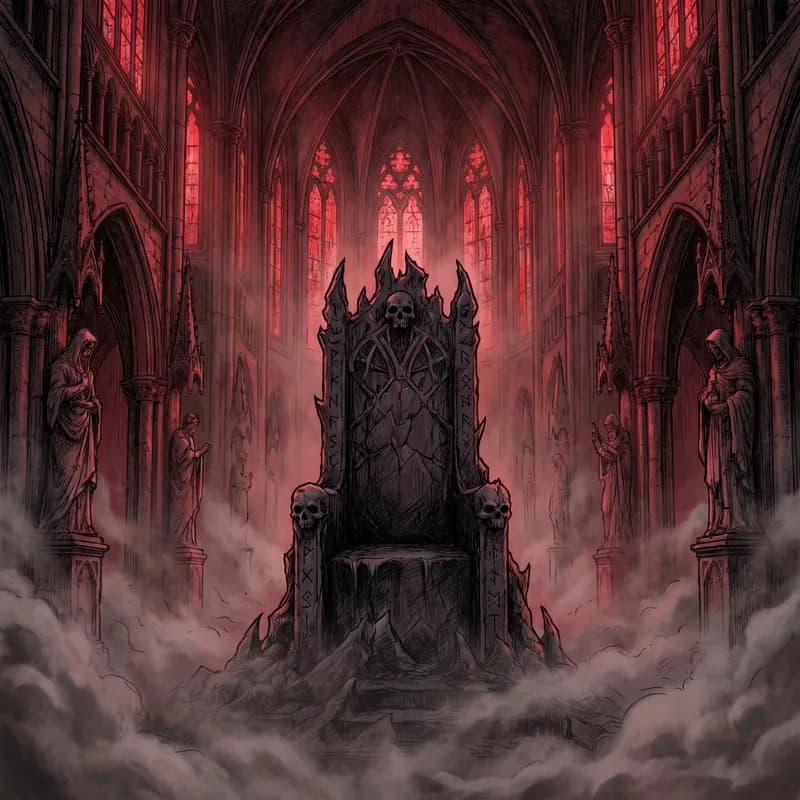

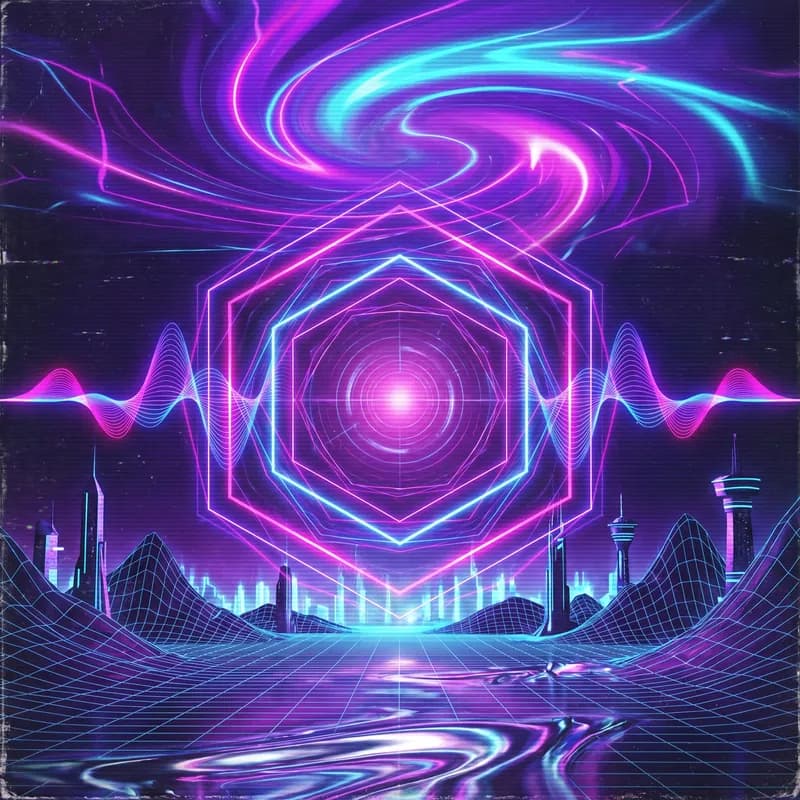


Each cover above came from the prompt under it, made with the Album Cover Maker.
AI Image Generator
The general tool: three models, 11 aspect ratios and output up to 4K. You can start from a text prompt or edit an image you upload.
Credits: 7 to 32 per image, depending on model and resolution
Good to know
- On the free plan, generated images are kept for 24 hours. Download the ones you want to keep straight away.
Album Cover Maker
Makes square 3000 × 3000 covers, the size most streaming services ask for.
Credits: Same as the AI Image Generator
Good to know
- Most streaming services reject covers with web addresses or social handles on them, so keep text to the artist name and title.
Music Logo Maker and Music Poster Maker
Logos for artists, bands and DJs in avatar, merch and banner sizes, and posters for shows and releases in 9:16 story, A3 print and event formats.
Credits: Same as the AI Image Generator
Make a flyer with the music poster makerOther things you can generate
Songs are not the only thing people come here for. Three tools cover the rest.
Sound Effect Generator
Short sounds, ambience and background loops from a text description. Video editors use it for whooshes and room tone; game developers use the loop setting for menu music.
Credits: 10
Try the AI sound effect generatorMashup Generator
Upload two songs and it blends them into one new track, with or without vocals. Songs in a similar tempo blend much more naturally, so check them with the BPM Calculator first.
Credits: 10
Blend two tracks with the AI mashup generatorMIDI Generator
Turns a song into MIDI notes (pitch, timing and velocity for drums, bass, keys and so on) that you can open in any DAW and re-orchestrate.
Credits: 60 · Where: Generate MIDI, in the song’s ⋯ menu in the generator’s song list
Convert audio with the MIDI generatorGetting your song out: files, lyrics and licensing
The last stretch. None of it is hard, but it is the part people forget.
MP3 and WAV download
MP3 is fine for listening and social media. If you are sending the song to a distributor or a mastering engineer, download WAV instead; it is lossless and available once you have bought any plan.
Credits: No credits · Where: the download button on the song, in the generator’s song list or in My Works
Good to know
- Your songs are private unless you choose to share them to the community.
LRC Generator
Times your lyrics to the audio and exports LRC, SRT, VTT, ASS and a few other formats. Use LRC for music players and karaoke, and SRT or VTT for video subtitles.
Credits: 10 · Where: Generate Synced Lyrics, in the song’s ⋯ menu, or the LRC Generator page
Sync lyrics with the LRC generatorCommercial license
Paid plans include commercial use, so you can release your songs on streaming and video platforms or use them in client work. Yearly plans can also download a license certificate for an individual song, which is what you show if a platform, a Content ID claim or a client asks for proof.
Credits: Commercial use on paid plans; per-song certificates on yearly plans · Where: Commercial License Certificate, in the song’s ⋯ menu or on the song in My Works
View your commercial licenseFree tools for lyrics, key and tempo
None of these are required, since the generator can write everything for you. But if you care about what the song says, ten minutes with them before you generate makes a bigger difference than any setting. All of them are free.
Lyrics Generator
Give it a topic and a mood and it drafts verses, a chorus and a bridge. We treat the output as a first draft: keep the lines that sound like you, rewrite the rest, then paste it into Lyrics Mode.
Credits: Free
Write lyrics with the AI lyrics generatorRhyme Analyzer
Paste a verse and it marks the rhyme scheme and syllable count of each line. It is most useful for rap, where uneven syllables are the usual reason a line feels rushed.
Credits: Free
Check your verses in the rhyme analyzerChord Generator
Suggests chord progressions in any key. Handy if you play an instrument and want to sketch the harmony before you generate.
Credits: Free
Build a progression with the chord generatorBPM Calculator and Key Detector
Upload a reference track to get its tempo, or use the Key Detector to get its key and scale. Put those numbers in your style tags when you want a new song to sit next to an existing one, for example in a DJ set or a video edit.
Credits: Free
Find the tempo with the BPM calculatorSong Analyzer and Similar Songs
The Song Analyzer reports BPM, key, structure and energy in one go. Similar Songs suggests 12 tracks that sound like a song you love, which is a good way to find words for a style you can hear but cannot describe.
Credits: Free
Find songs like your reference with the similar song finderStep-by-step AI music workflows
Four routes we see people take again and again. Borrow whichever is closest to what you are doing.
Releasing an original song
The full route, from a blank page to something you can upload to a distributor.
- Draft lyrics with the Lyrics Generator, then edit them until they sound like you.
- Generate in Lyrics Mode and keep the better of the two takes.
- Extend it to full length and use Replace Section on any line that bothers you.
- Make a 3000 × 3000 cover with the Album Cover Maker.
- Download the WAV (and, on a yearly plan, the song’s license certificate), then make a music video to go with it.
Making a karaoke or practice version of your song
Handy for rehearsing a song you made, or performing it live.
- Open the song’s ⋯ menu in the generator’s song list, choose Separate Vocals, and pick 2 stems.
- Shift the instrumental into your key with the Pitch Changer.
- Slow down the tricky parts with the Speed Changer while you learn them.
- Generate an LRC file so the lyrics scroll in time.
Finishing a voice memo or a beat
For when you start with audio rather than an idea.
- If you have a vocal, upload it to Add Instrumental.
- If you have a beat, upload it to Add Vocals along with your lyrics.
- Split the result into stems to keep mixing in your DAW, or convert it to MIDI.
Common mistakes (and what to do instead)
These come straight from the questions our support team answers most. Most of them take seconds to avoid once you know.
Pasting finished lyrics into Description Mode
Description Mode treats your text as an idea and writes new lyrics. To have your own words sung, switch to Lyrics Mode first.
Marking sections with round brackets, like (Chorus) or (Verse 1)
Only square brackets are read as structure: [Verse], [Chorus], [Bridge]. Words in round brackets may be sung. Keep round brackets for backing vocals you actually want to hear.
Putting an artist’s name in the style or description
Artist names are not supported and can make a generation fail. Describe the sound instead: genre, era, instruments, voice. "80s synth-pop, male vocal, gated drums" works better than a name.
Using the lyrics of an existing song
Lyrics that match a published song are blocked, and retrying the same lyrics will be blocked again. Write your own, or rework the lines substantially.
Leaving Length on Auto with only a few lines of lyrics
With very short lyrics, Auto often produces a song well under a minute. Write a full verse and chorus, or pick a length yourself.
Assuming the Length setting is remembered
Length goes back to Auto when the page reloads. Check it before you press Generate.
Expecting Generate Lyrics to guess the language you want
It follows the language you type in. A title alone or a few English tags usually gives English lyrics, so write a full sentence in your target language, or name the language.
Thinking split stems were not saved
Stems stay attached to the original song rather than being added as a new one. Open that song’s ⋯ menu in the generator’s song list and choose View Separated Tracks.
Deleting a song to get the credits back
Deleting does not return credits, because the song was made. Credits for a generation that fails are normally returned automatically; you can check in your credit history.
Waiting on a song that says "processing" for ages
If you locked your phone or switched apps while it was generating, the page may not have updated. Refresh it; the song is usually already finished in your song list.
Reading the yearly plan price as a monthly charge
Yearly plans show the price per month for comparison, but the whole year is charged at once. Starter yearly, for example, is shown as $9.99 a month and charged as $119.88.
Using a full-body or group photo for lip sync
Lip sync needs a close, front-facing shot of one face. Crop to head and shoulders before you upload.
How much does it cost to make an AI song?
Everything runs on credits, and you only spend them when you make something. A free account is topped back up to 20 credits every day, which is four songs. That is enough to learn the tools properly before you decide whether to pay.
Free
$0
20 credits a day
4 songs a day
Starter
$14.99 / month
$9.99 / month billed yearly
1,000 credits a month
About 200 songs
Standard
$29.99 / month
$19.99 / month billed yearly
3,300 credits a month
About 660 songs
Premium
$59.99 / month
$39.99 / month billed yearly
7,900 credits a month
About 1,580 songs
- Paying yearly takes 33% off. Starter works out to $9.99 a month, and on yearly Premium each song costs less than 3 cents. The yearly price is charged once for the whole year (for Starter, $119.88), and the credits are added month by month.
- Paid plans add WAV downloads, a faster generation queue and commercial use.
- Plan credits refresh each billing period and do not roll over. If you run out mid-month, subscribers can buy extra credit packs; those never expire, and your plan credits are always used first.
- You can cancel any time, and the plan stays active until the end of the period you paid for.
Frequently asked questions
Can I make a song with AI for free?
Yes. A free account gets 20 credits a day and a song generation costs 10, so that is two generations, or four songs, a day. Unused daily credits do not pile up; the balance is simply topped back up to 20. The songwriting tools and the browser audio tools cost nothing at all.
How long does it take?
Usually a minute or two for a pair of songs. Splitting stems takes about the same. Music videos take longer, depending on how long the song is.
Can I use my own lyrics?
Yes. Switch to Lyrics Mode and paste them in, up to 5,000 characters. Put section names in square brackets, like [Chorus], so they are not sung.
How long can an AI song be?
In Lyrics Mode you can pick up to 6 minutes. At 5 or 6 minutes, at least one of the two takes reaches the full length. For anything longer, use Extend on the finished song.
Can I make music without vocals?
Yes, switch on Instrumental before you generate. For a long instrumental, use Lyrics Mode, type [Instrumental] in the lyrics box, switch on Instrumental and choose a length. For a song you already made, run it through the Stem Splitter to take the vocals out.
Can I use AI songs commercially?
Yes, paid plans include commercial use: you can release songs on streaming and video platforms or use them in client work. Yearly plans can also download a license certificate for each song, useful if a Content ID claim or a client asks for proof.
Can I turn my song into a music video?
Yes, in four ways: a full multi-shot video with the AI Music Video Generator, a singing photo with Lip Sync Music Video, short vertical clips with the Short Video Maker, or a quick lyric video with Lyric Card.
Which file formats can I download?
MP3, plus lossless WAV once you have bought a plan. Stems download as standard audio files that open in any DAW.
What happens to my credits if a generation fails?
They are normally returned automatically, and you can see the refund in your credit history. Deleting a song you did not like does not return credits, because the song was made.
Are my songs public?
No. Songs are private unless you choose to share them to the community.
Make your first song now
You get 20 free credits every day. No card required.